A better CRM for Odoo.
Clear deal pages, a pipeline that keeps its own rules, a phone in the browser and a shared WhatsApp inbox, inside the Odoo that already holds your quotations, orders and invoices. Arabic and English.
4 products. Start with one, add the next when you are ready.
Most sales teams sell in three places, and the CRM only sees one of them.
Deals live in the CRM, calls happen on a desk phone, and customer chats sit on someone's personal WhatsApp. The manager's report shows a third of the picture, and nobody can say when the customer was last contacted.
The usual setup
Three places a customer conversation can be. Only one of them is on the deal.
With Mindrift
A call or a chat lands on the lead or deal it belongs to, with who handled it and when.
Your morning sales meeting, answered on one screen.
Leads, deals, accounts and contacts in plain words, a deal page that shows what needs attention, and a home page that answers a sales manager's morning questions.
Built forSales teams that sell to companies, with a pipeline, quotations and follow-ups, in one company or several.
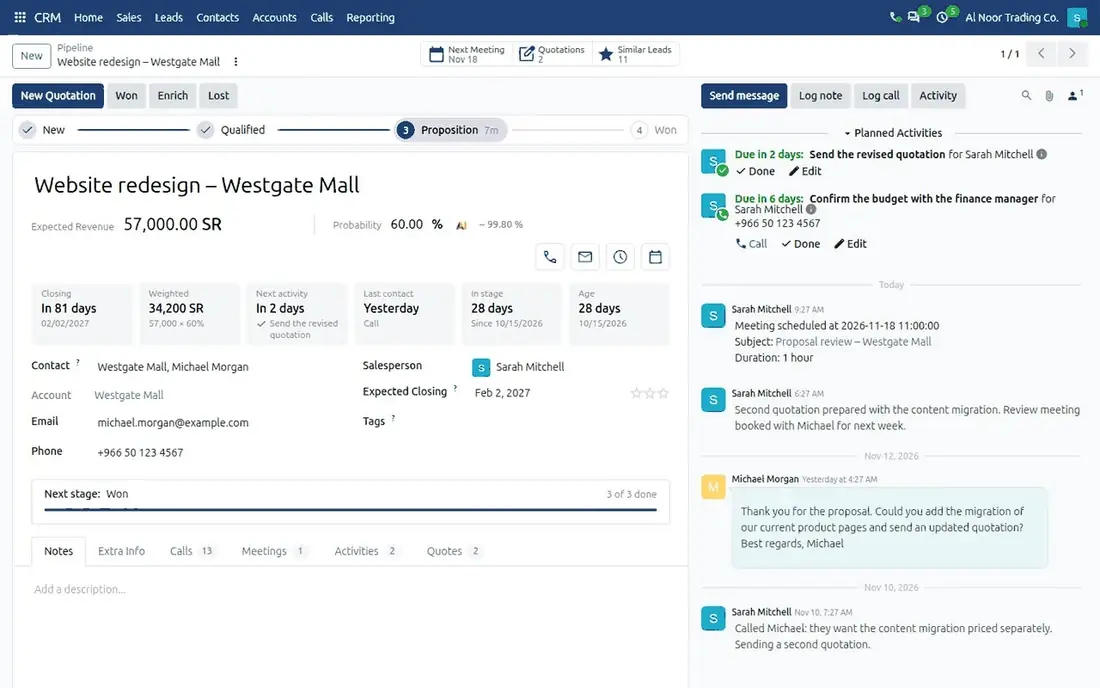
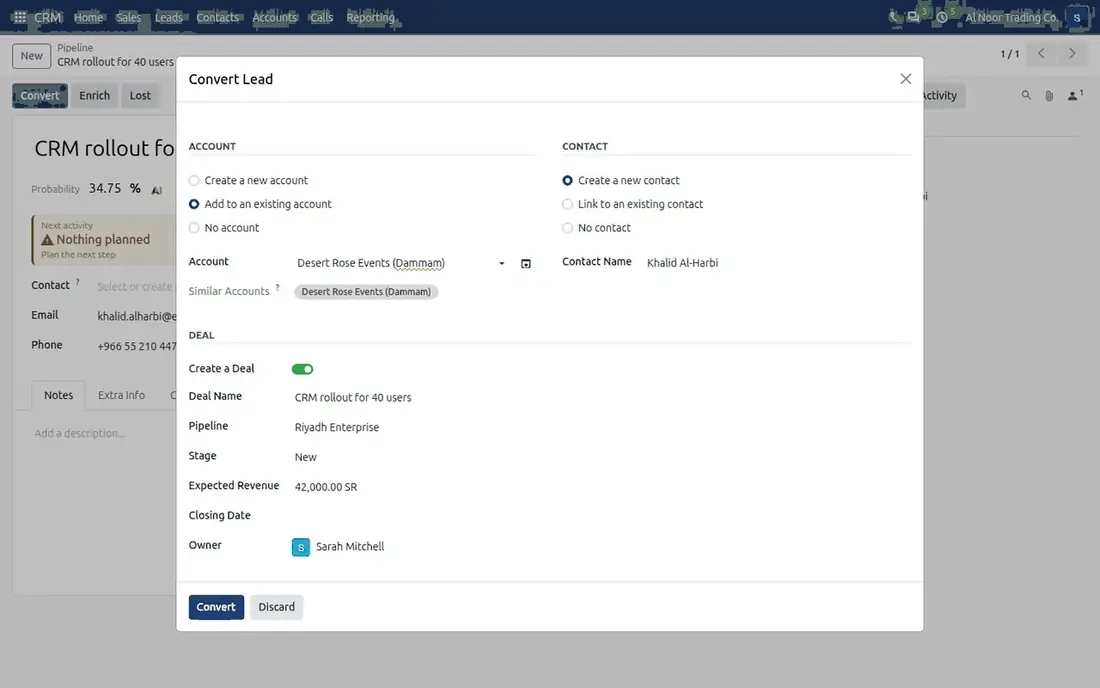
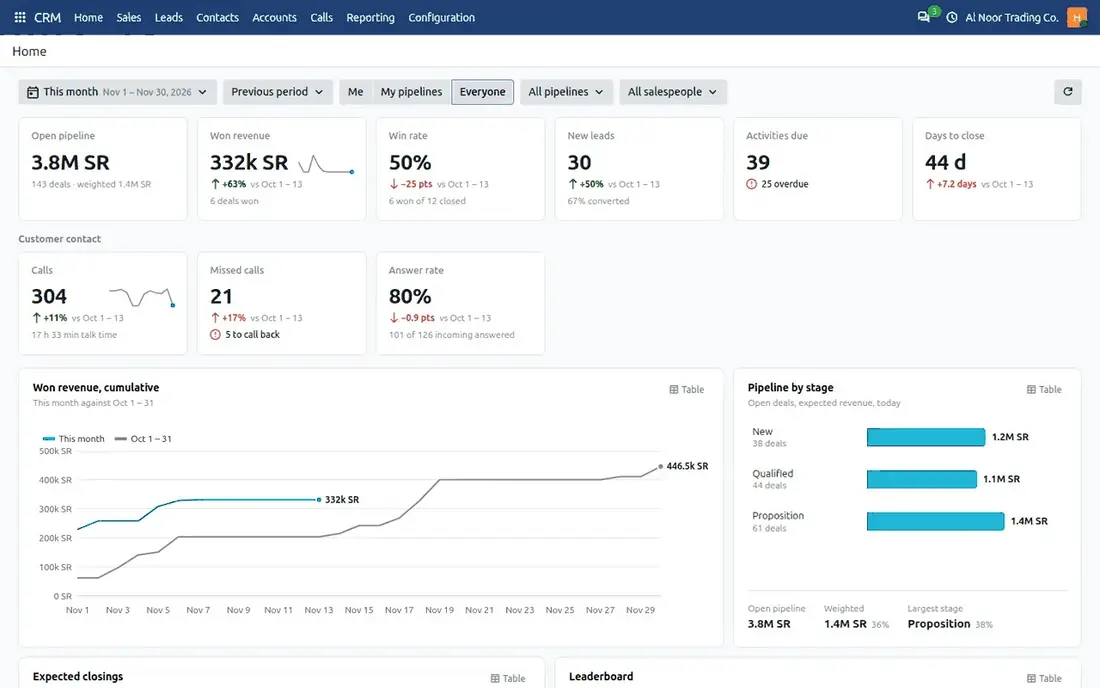
The CRM home for a sales manager: six key figures, the customer contact row and the pipeline by stage · A deal page: stage path, quick actions, key facts and tabs with their counts · One dialog turns a lead into an account, a contact and a deal.
What changes for you
The next step on every deal
What is late, what is planned and when the customer was last contacted.
Clean conversion
A lead becomes an account, a contact and a deal in one dialog, with likely duplicates proposed first.
Figures you can open
Managers click any figure on the home page and get the deals behind it.
Right figures for each person
Each person sees only the figures their access rights allow, computed by the server.
A deal from first enquiry to won
- An enquiry arrives by email or is typed in, and becomes a lead.
- Convert proposes the matching account and contact, and creates the deal.
- The deal page shows the stage path, the key facts and the next activity.
- Calls, emails and meetings are logged on the deal as they happen.
- A quotation is sent from the deal and appears in its Quotes tab.
- The deal is won, and the home page counts it in revenue, win rate and days to close.
What's inside CRM: 12 capabilities
Deals, accounts and contacts
"Opportunity" reads "Deal" across the CRM, in English and Arabic. Organisations and people each have their own list.
Lead conversion
Create, link or skip the account, the contact and the deal. Accounts with the same name or email domain are proposed.
Deal page
Numbered stage path with time in stage, quick actions for Call, Email, Activity and Meeting.
Key facts
Closing date, weighted value, next activity, last contact, time in stage and age. What needs attention is coloured.
Related tabs
Meetings, Activities, Calls and Quotes on the deal, each with its count.
Six key figures
Open pipeline, won revenue, win rate, new leads, activities due and days to close, compared with the previous period.
Nine charts
Won revenue over time, pipeline by stage, expected closings, leaderboard, lost reasons, lead sources and the conversion funnel.
Filters
Period, comparison, pipelines, salespeople, and a scope of Me, My pipelines or Everyone. The page remembers them.
Click-through and tables
Click a figure, a bar or a funnel step to open its records. Every chart also reads as a table.
Converted without a deal
A lead that only becomes a contact is archived as converted, not counted as lost, and can be restored.
Leads by email
Each sales team's email address creates leads.
Phone and tablet
The home page adapts to a small screen, with the filters behind one button.
A pipeline that keeps its own promises.
Say what a deal needs before it moves to the next stage. The salesperson is asked for it at the moment of the move, and every exception has a name and a reason.
Built forSales managers who want the pipeline to mean what it says, without policing it by hand.
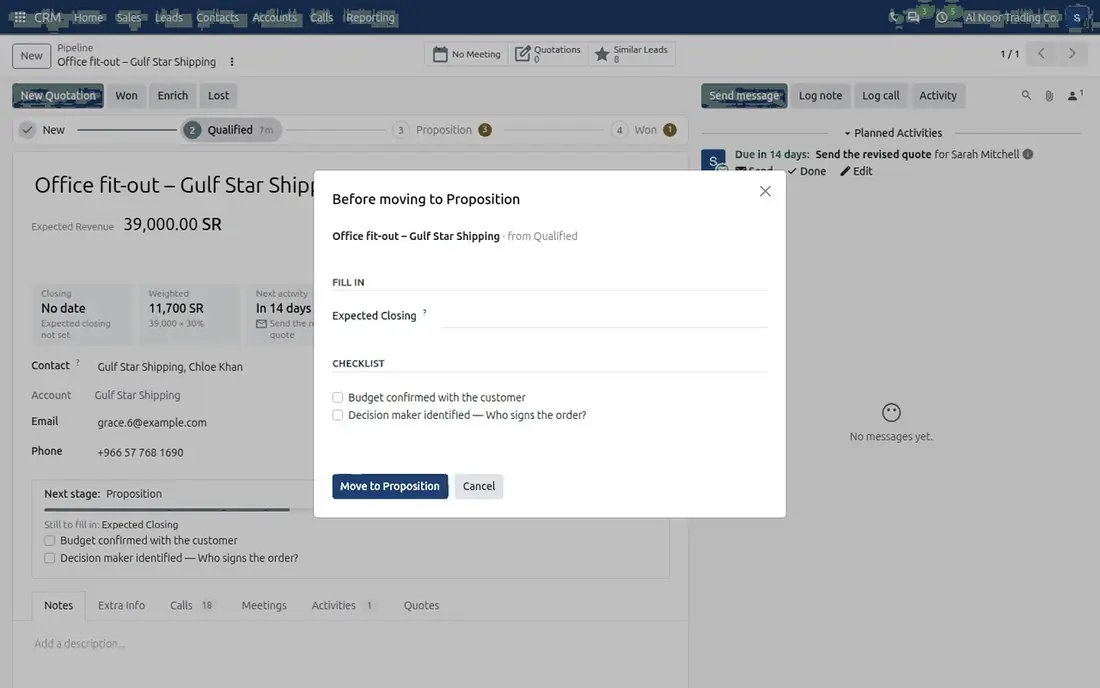
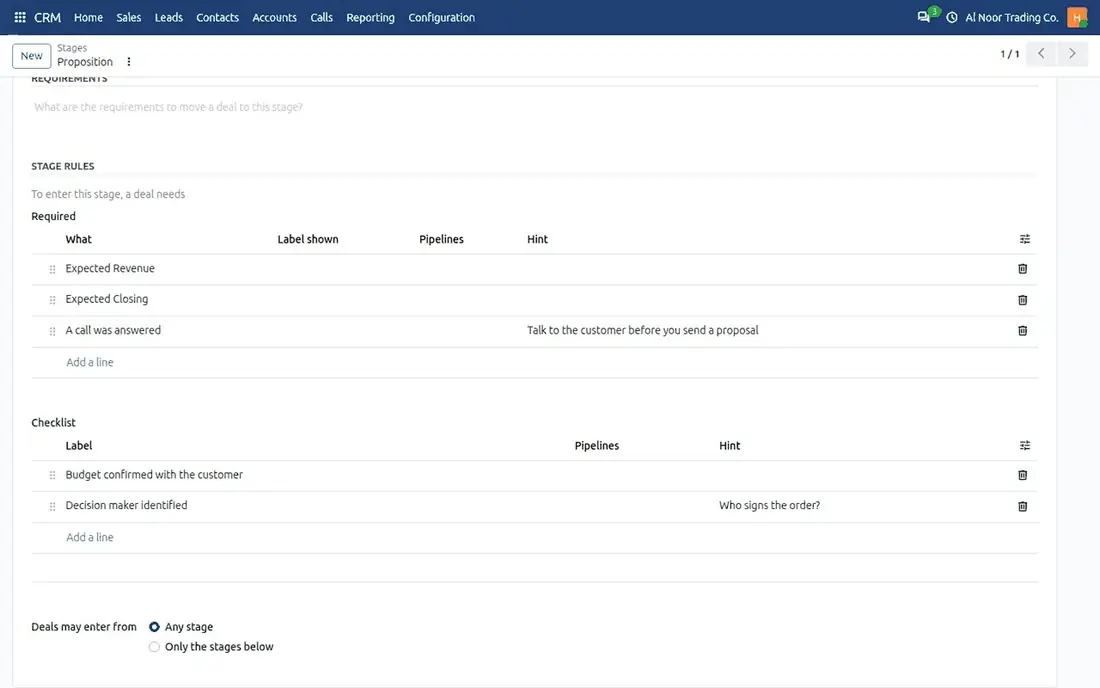
A move that is not ready: the dialog lists only what is missing, and the deal moves when it is filled in · The rules of the Proposition stage: required information, a checklist and where a deal may come from.
What changes for you
Stages that mean something
A deal in Proposition has its revenue, closing date and checklist, because the rules asked for them on the way in.
Only what is missing
A refused move opens a dialog that lists only the missing items. Fill them in and the deal moves in the same step.
Exceptions on record
Managers can move a deal past the rules by typing a reason, and the report shows every such move.
Every route checked
The board, lists, the Won button, imports, automation rules and the API.
From no rules to a pipeline you can trust
- Switch on the recommended rules in one dialog, for one pipeline or all.
- Add required fields, checklist items and conditions stage by stage.
- Salespeople see a Next stage block with what is still missing.
- A move that is not ready asks for the missing items, then completes.
What's inside Stage Rules: 10 capabilities
Required information
Any field of the deal or a custom lead property, with your own label and a one-line hint.
Checklists
Items the salesperson ticks, such as "Budget confirmed with the customer". Ticks are recorded on the deal.
Named conditions
A quotation was sent, a call was logged, a call was answered, consent to calls recorded.
Allowed moves
Say which stages a deal may come from, or require one step at a time. Moving back stays allowed.
Lost reason required
A deal cannot be marked lost without a reason, by any route.
Per pipeline
A rule applies to every pipeline or only to the ones you name.
Move anyway
Managers, and users you choose, move a deal past the rules with a reason.
Deals that slipped
A filter, a notice on the form and a sign on the card mark deals that no longer meet their stage's rules.
Lead assignment
Automatic assignment skips a lead the rules would refuse and reports how many were left out.
Built for size
Measured on 100,000 leads with rules on every stage: a mass edit of 500 deals takes about a quarter of a second.
Good to know
Nothing is switched on at install. Rules are checked when a deal enters a stage, so emptying a field later is allowed and the deal is then marked.
Click a number, start selling.
A phone in the top bar of Odoo. Click any number to call, see who is calling before you answer, and find every call on the lead or deal it belongs to. It registers with your own phone system.
Built forTeams that sell or support by phone and have, or plan, a PBX that accepts browser phones.
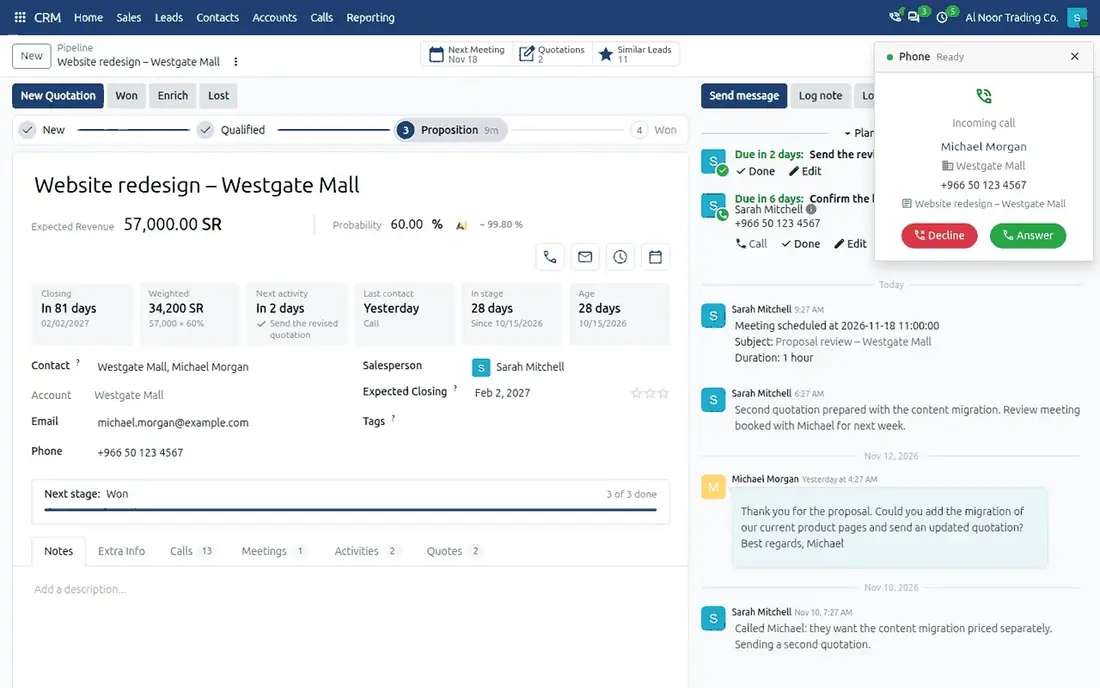
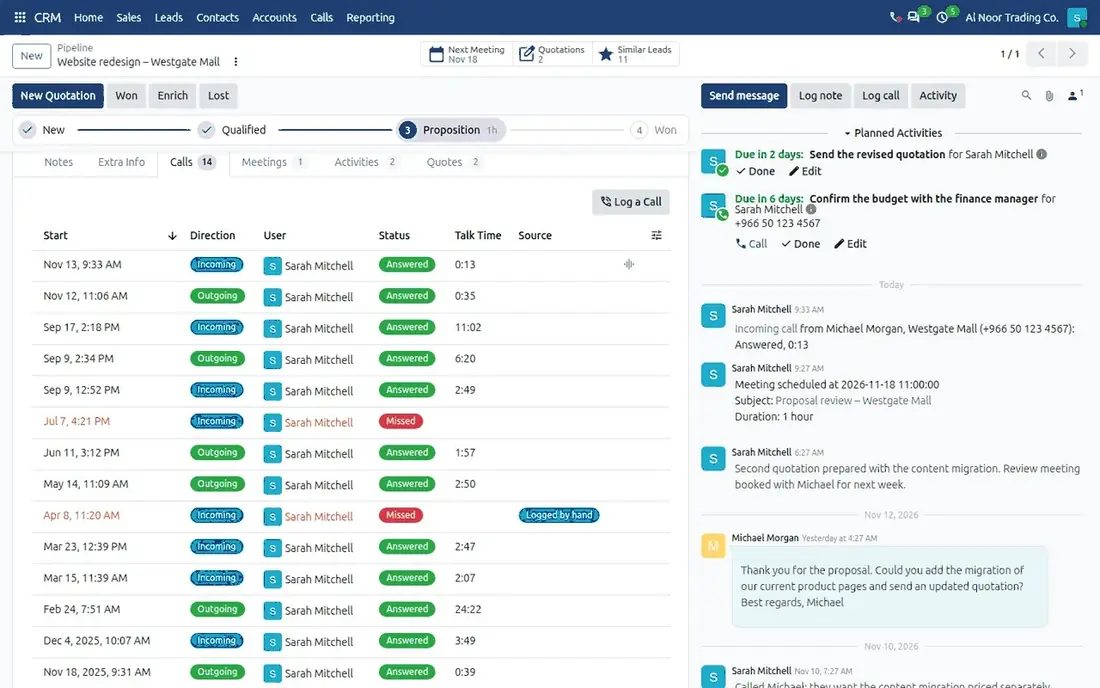
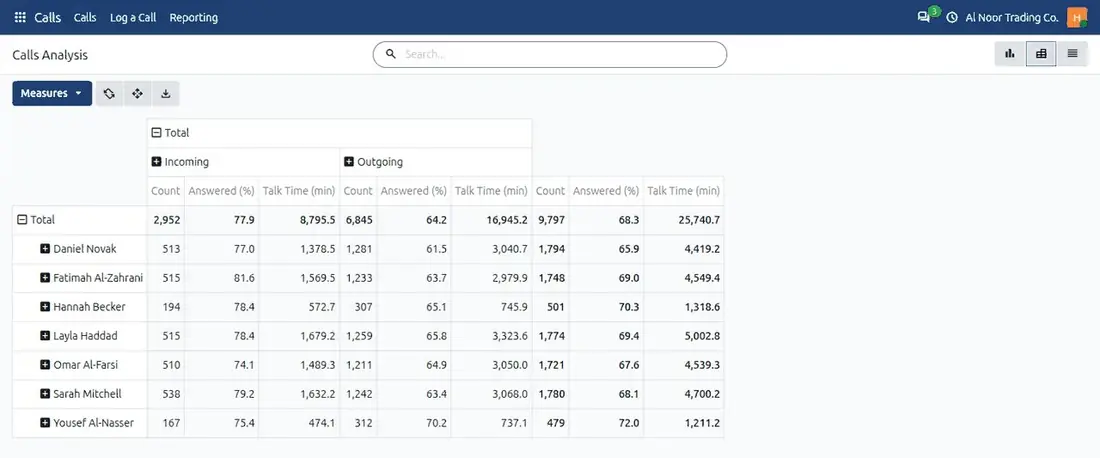
An incoming call: the card names the caller, the company and the deal the call will be logged on · The Calls tab of a deal, with direction, outcome and talk time · Calls Analysis by user and direction, with the answered share and talk time.
What changes for you
Nothing to install
A browser and a headset are enough.
Every call on the record
Logged on its contact and on the right lead or deal, with its outcome and talk time.
Missed calls followed up
A missed call becomes a call-back activity, and calling back closes it.
Do-not-call respected
A number that asked not to be called is refused before it is dialled, on calls, transfers and consultations.
A call from ring to record
- The phone icon turns green a few seconds after the user opens Odoo.
- An incoming call shows the caller's contact, company and deal.
- Answer in any Odoo tab. Mute, hold, send tones or record.
- Transfer at once, or consult the colleague first.
- The call is posted on the contact and the deal with its outcome.
- Calls, missed calls and the answer rate appear on the CRM home.
What's inside Softphone: 12 capabilities
Click to call
From any phone number in Odoo: a contact, a lead, a deal, a Call activity or the recent calls.
Incoming call card
Caller, company and the record the call will be logged on, with Answer and Decline.
Transfer
Transfer at once, or consult first, then complete the transfer or return to the caller.
Several tabs
One tab holds the line. Answer or hang up from any Odoo tab.
Call log
Answered, Missed, Declined, No Answer, Busy, Answered Elsewhere or Failed, with talk time.
Missed-call follow-up
One call-back activity per caller that counts the attempts.
Log a call by hand
Calls made on a mobile or desk phone are logged in a short form and counted like the others.
Calls Analysis
Graph and pivot by user, day or week, direction and outcome.
Recording
Off, on demand or every call, with automatic deletion after a number of days and a storage limit.
Do-not-call check
Every outgoing call, transfer and consultation waits for the server's check.
Connection test
Seven checks from the user's own browser, from the secure page to audio both ways.
Roles
Own calls, supervisor for all calls, and administrator.
Phone systems
Tested with Asterisk 20. FreePBX is expected to work and is not yet tested. 3CX is not supported, because it does not accept third-party browser phones. Needs SIP over secure WebSocket with a trusted certificate, and one extension per user.
Good to know
Tested in Google Chrome. The softphone is not an emergency phone. The recording notice is shown to your user and is not played to the other party.
Bring WhatsApp off personal phones and onto the deal.
Your customers already write on WhatsApp. WhatsApp Chats brings those conversations off personal phones into one shared inbox in Odoo, on all your company numbers at once, next to the deal they belong to.
Built forSales and support teams whose customers prefer chat. It is for conversations with customers, not for marketing broadcasts.
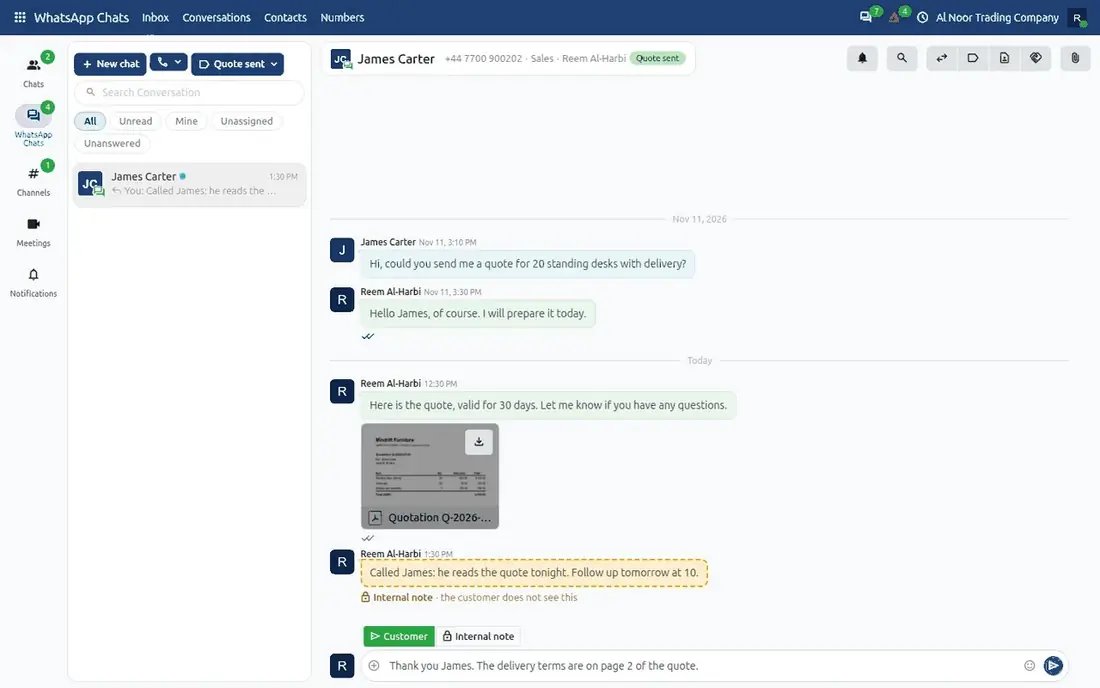
A chat in the inbox: customer messages, a file and an internal note the customer does not see.
What changes for you
Every number, one inbox
Each company number has its own team and supervisors.
Nobody answered twice
Chats are taken, assigned and transferred, so a customer is not answered twice or left waiting.
Everything in the thread
Voice notes, pictures and documents sit in the same thread as the text.
Stop means stop
A customer who writes Stop is not messaged again.
A chat from first message to deal
- A customer writes to the Sales number.
- The chat goes to the responsible agent, or to the team: the first to answer takes it.
- The agent answers, adds an internal note or uses a quick reply.
- One action creates a lead from the chat.
- The deal lists the chat in its Chats tab and counts it as the last contact.
- A supervisor sees the chats that wait too long and reassigns them.
What's inside WhatsApp Chats: 12 capabilities
Several numbers
Sales, support and branch numbers in one inbox, each with its own team.
Shared inbox
Filters for Unread, Mine, Unassigned and Unanswered, by number and by label.
Take, assign, transfer
An agent takes a chat, a supervisor assigns it, and a hand-over carries a note.
Roles per number
Agents answer, supervisors read and assign, administrators manage. A sales team can be the team of a number.
Voice notes and files
Voice notes play in the chat. Pictures, documents, audio and video go both ways.
Internal notes
A clear switch between a message to the customer and a note only the team sees.
Labels and quick replies
Labels such as Complaint or Quote sent, and saved answers that fill in the customer's name.
Unanswered alerts
An alert, and optionally a to-do, when a customer has waited longer than the time you set.
On leads and deals
A Chats tab, a WhatsApp button beside Call and Email, and one action that creates a lead from a chat.
Stop is honoured
A customer who asks to stop is not messaged again. Unclear requests go to a supervisor.
Sensible limits
A reason recorded before a first message, daily limits per number, and quiet hours at night.
A permanent record
Messages cannot be edited or deleted. Content can be emptied after a number of days, and a contact's chats erased on request.
Before you choose it
A number is connected as a linked device of its phone, the way WhatsApp Web is. It is not Meta's WhatsApp Business API: there are no message templates and no per-message fees. The connection runs through Mindrift's hosted gateway, a subscription service.
The risk, plainly
WhatsApp's terms do not allow unofficial applications, and WhatsApp can restrict or ban a linked number. Link a business number, never one you cannot afford to lose.
Status
Built and tested against a simulated WhatsApp service. The release follows the first test with a real number.
Planned for a later release
An assistant that summarises a chat, turns a voice note into text and drafts a reply for the agent to review. Mindrift is not affiliated with, endorsed or supported by WhatsApp or Meta.
One platform under every product.
Your phone system stays yours
The softphone connects each browser straight to your own PBX. You keep your numbers, provider and call rates.
Respect for the customer
Do not call, do not message and consent are recorded with who and when, and checked before every call.
Community or Enterprise
Tested on both editions of Odoo 20, and designed to sit beside Odoo's own phone and WhatsApp apps.
Your data, your Odoo
CRM and call data stay in your own database. Calls do not pass through the Odoo server or through Mindrift.